Tutorial — Delphi — Shell Extension — Icon Overlay
UNDER DEVELOPMENT
Summary
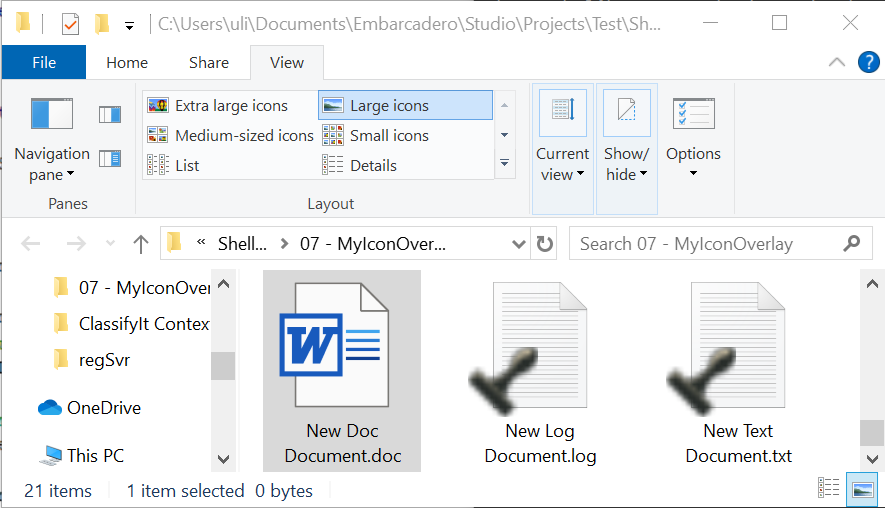 This article provides a step-by-step tutorial to create an icon overlay for Windows Explorer using Delphi. This is called an Icon Overlay Shell Extension which provides a small graphical overlay to the file icons in the Windows Explorer.
The illustration shows the result: MyIconOverlay displays a black stamp icon as an overlay on all .log and .txt file icons.
You need the Embarcadero Delphi programming environment. No special features or libraries are required.
You only need a basic understanding of how to create, compile and run Delphi code.
This tutorial provides step-by-step guidance for creating and implementing a COM object compiled into a dynamic-link library (DLL). The DLL contains the code for the shell extension. The tutorial also explains how to compile, register and unregister the DLL so that you can rebuild updated code.
Be careful: Windows Explorer provides the desktop, taskbar and file-management interface. A faulty shell extension can crash Explorer, making those parts of the Windows interface unavailable. If Explorer no longer starts, press Ctrl+Alt+Delete and select Task Manager. Start a new task named regedit to open Registry Editor, and remove the registry key that tells Explorer to load the extension when displaying icons: HKEY_LOCAL_MACHINE\SOFTWARE\Microsoft\Windows\CurrentVersion\Explorer\ShellIconOverlayIdentifiers\MyIconOverlay
Then restart Explorer by running explorer as a new task in Task Manager.
Tutorial
The tutorial starts with a new project and uses screenshots to guide you through creating a working example.
Download Tutorial for Icon Overlay
Original article content, with grammar and spelling edited for readability. Illustrations and downloads are retained. Source page ↗