How Do You Classify Emails
Case Study - How Do You Classify Emails
The short answer to “How do you classify emails?” is to use a tool which integrates with your email application and which is easy and intuitive for your users and administrators.
If you use Microsoft Outlook as your email application, you should test and use ClassifyIt - it supports and enforces your classification policy.
Prerequisite: You should have a Classification Policy for your information. If you don't have a Classification Policy, start small with classifications like: Internal and External, or even better with a proven classification schema like TLP (Traffic Light Protocol). If you need help, please contact us at: delphi@ugarbe.de
Classify an Outlook Email with ClassifyIt
The example below is based on the TLP classification policy.
When a user opens an email, the email receives automatically a default classification which is directly visible to the user. In this example the TLP classification WHITE is applied.
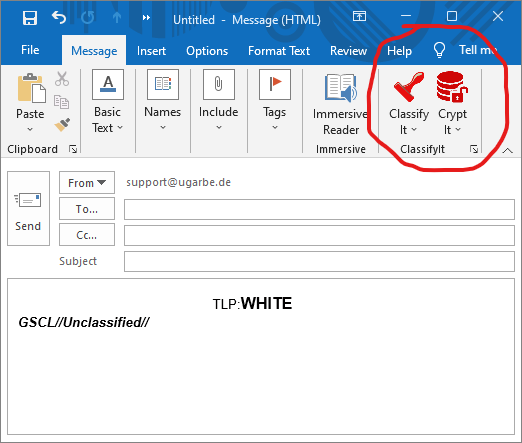
Besides the classification (WHITE in this example) ClassifyIt also adds a standardised label, which is useful when exchanging classified emails with organisations outside your own. This is not mandatory and can be disabled or displayed in another format.
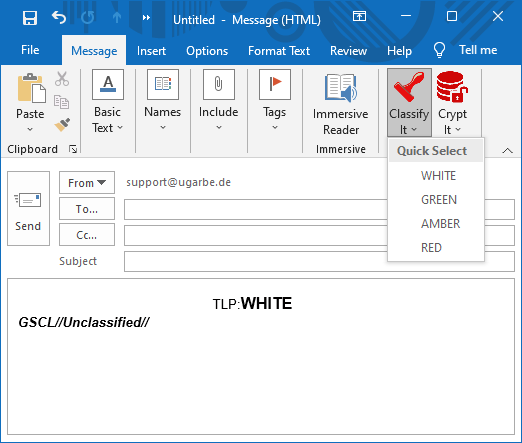
If the default classification is not correct for the content and attachments of the email, the user can easily change the classification. The most used feature in ClassifyIt is the Quick Select menu to apply any classification permitted by your organisation. In TLP these are: WHITE, GREEN, AMBER or RED.
Questions - please feel free to contact us: delphi@ugarbe.de
Original article content, with grammar and spelling edited for readability. Illustrations and downloads are retained. Source page ↗